





Avylet 9.26" Wireless Car Stereo with CarPlay 📻

Description:
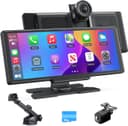
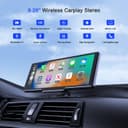
This portable car stereo from Avylet brings smartphone features and dash cam recording to a compact 9.26 inch touchscreen, making in-car navigation and media control simpler and more integrated. It combines wireless Apple CarPlay and Android Auto with an ultra high-definition front dash cam and a 1080p rear camera, so you can follow routes and capture road footage without adding bulky hardware.
Key Points
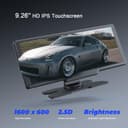
The unit supports wireless Apple CarPlay and Android Auto for hands-free navigation, calls and music control, with voice assistants such as Siri or Google Assistant forming part of the hands-free workflow. The 9.26 inch IPS touchscreen has a 1600 x 600 resolution and offers split-screen operation to display maps and media at the same time. 📱
Recording is handled by a 4K front dash cam together with a waterproof 1080p rear camera that can show front and rear views simultaneously on the screen. The device supports loop recording and includes a 4GB card already inserted, with storage expandable up to 256GB. Do note that the dash cam and the screen require a Wi-Fi connection to your phone, and a single phone cannot be connected to both at the same time according to the manufacturer. ⚠️
Mounting is plug and play. The kit ships with an adjustable adhesive mount and a 360 degree suction holder so the display can be positioned on the dashboard, centre console or windscreen without dismantling the original radio. The unit runs from a 12 to 32 V car socket and coexists with factory radios by using Bluetooth, FM synchronisation or the supplied AUX cable for audio output.
Technical Specifications
- Name: Avylet 9.26'' Wireless Car Stereo
- Screen: 9.26 inch IPS, 1600 x 600 resolution
- Front camera: 4K dash cam, Rear camera: 1080p waterproof, simultaneous split-screen display
- Storage: 4GB card included, supports up to 256GB
- Power: 12–32 V input, plug and play installation
- Connectivity: Wireless Apple CarPlay, Wireless Android Auto, Bluetooth, AirPlay and Android Cast
- Warranty: 2 year warranty with technical support available
Usage Recommendations
For reliable wireless mirroring and casting, connect both your phone and the device to the same Wi-Fi network when using AirPlay or Android Cast. Keep your phone at least 30 centimetres away from the car charger while using CarPlay to avoid interference with the connection. The automatic brightness adjustment helps reduce glare at night, and the power-off memory preserves settings for up to three days so playback resumes more smoothly after a restart.
Practical Tips
If you plan to record long journeys, consider installing a larger memory card up to 256GB for extended continuous recording. Bear in mind that Huawei phones may not be compatible with the CarPlay function according to the manufacturer, and if you encounter connection issues consult the user manual FAQ section or contact support for guidance.
